Golf cart and LSV navigation that keeps you on legal roads.
Standard GPS doesn't know your vehicle has speed restrictions. CartPath finds routes on roads with speed limits of 35 mph or less, so you can drive your golf cart, LSV, or NEV with confidence. Search a destination, pick a route, and go — with turn-by-turn voice directions the whole way.

Everything you need to drive with confidence.
CartPath was built for golf cart and LSV drivers who want to stick to roads where they're allowed to drive. Search, plan, and navigate — all in one app.
Smart route planning
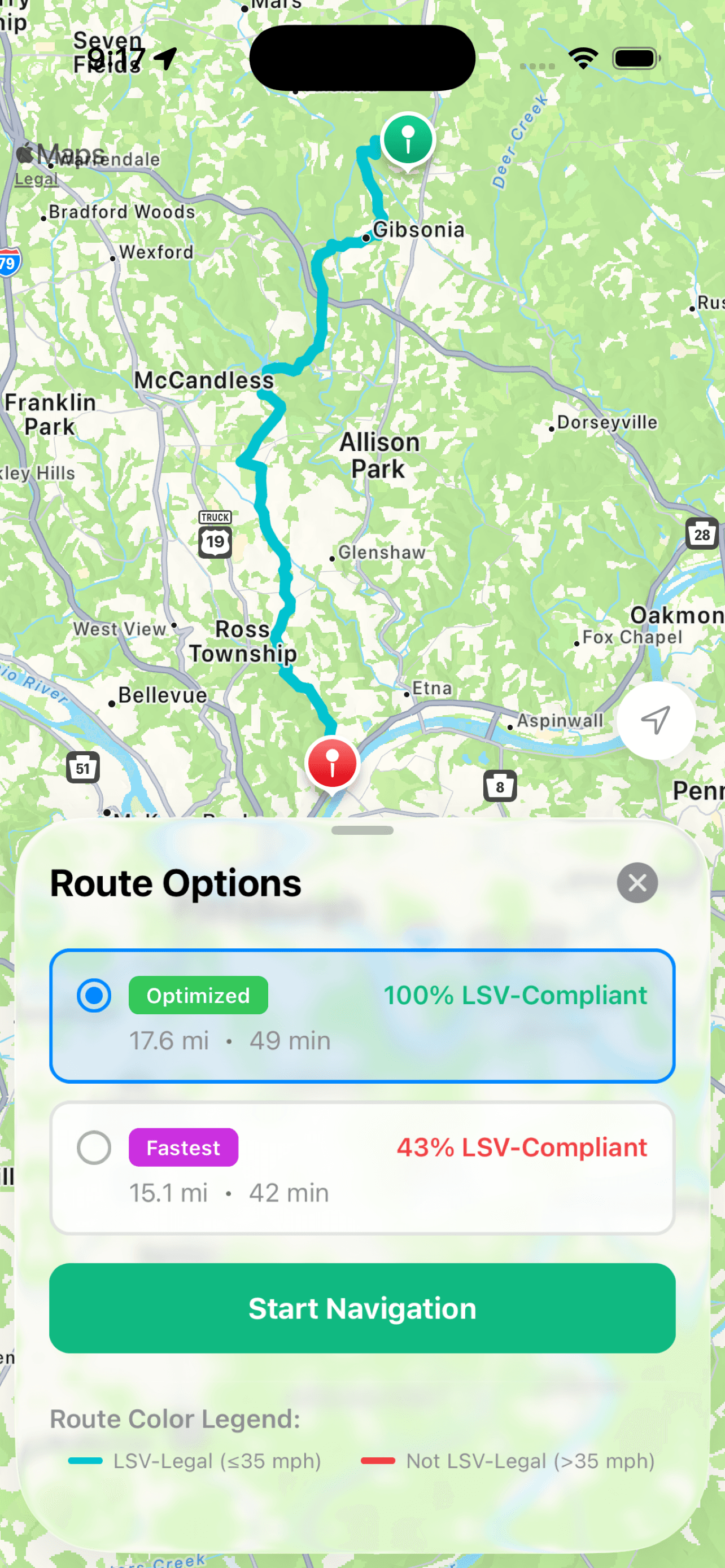
Search for a destination and CartPath analyzes every road segment’s speed limit to find a route that stays on LSV-legal roads. A built-in route planner that lets you choose from multiple options with compliance percentages so you know exactly what to expect.
Turn-by-turn navigation
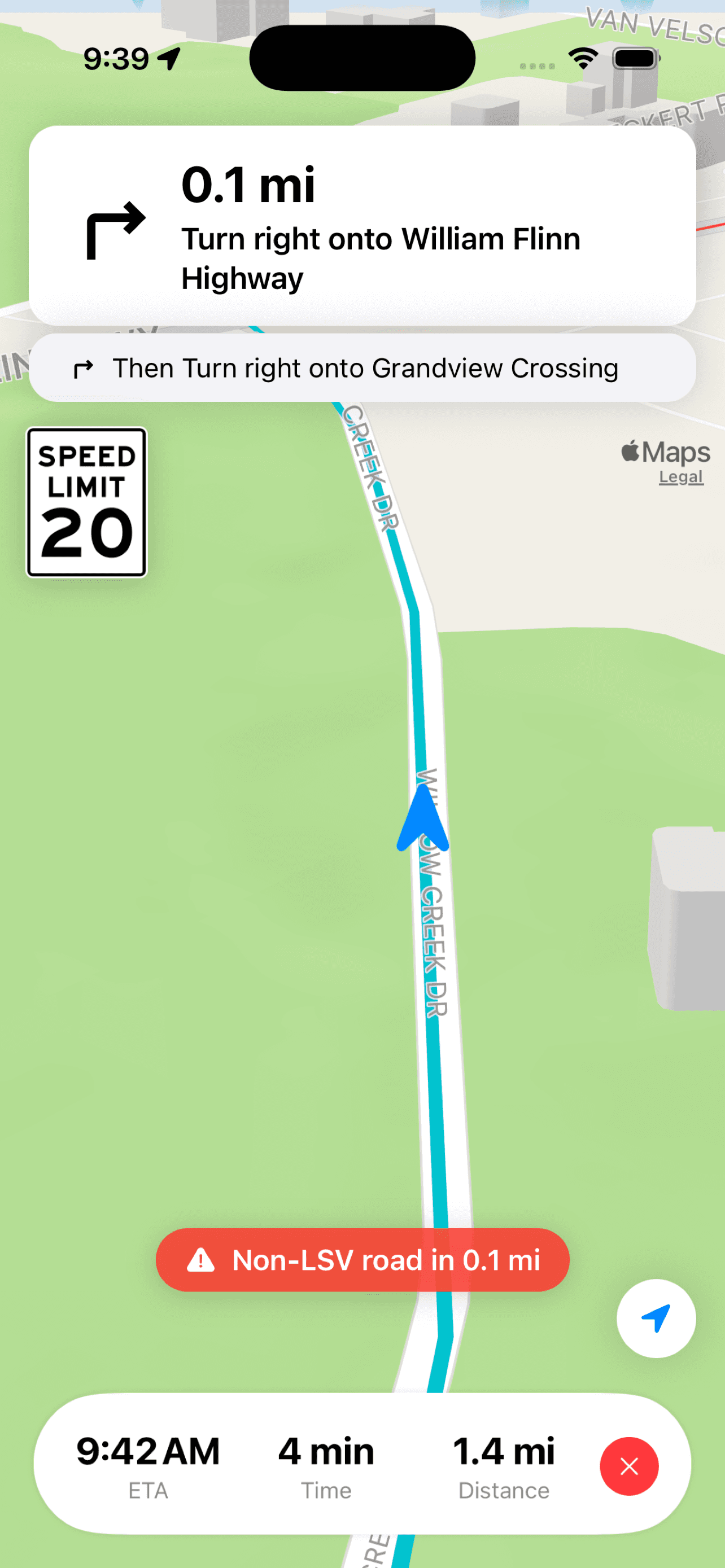
Get voice-guided directions with real-time speed limit display. CartPath warns you before you reach a non-LSV zone so you’re never caught off guard.
Destination search
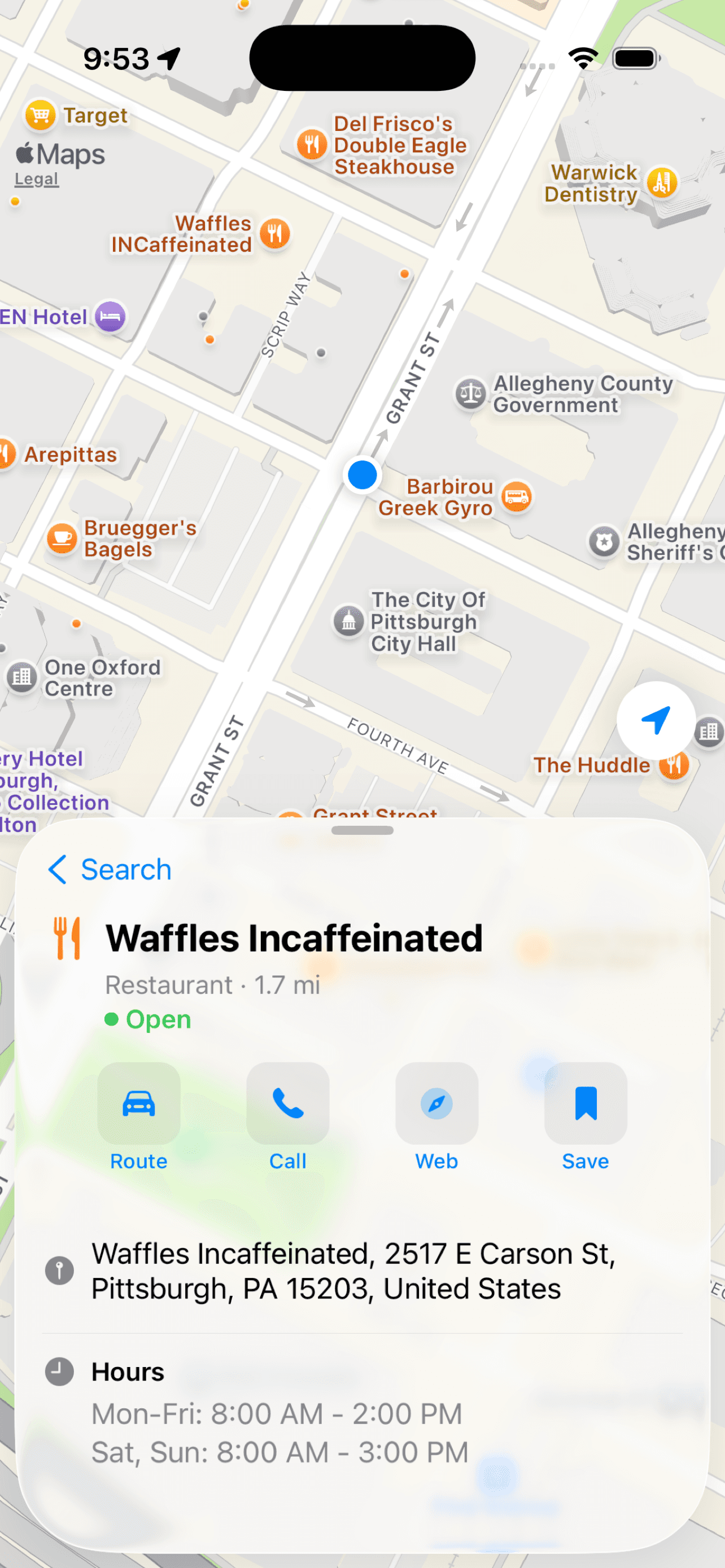
Find restaurants, shops, and places nearby with detailed info including hours, address, and distance. Tap “Route” and CartPath handles the rest.
Built for the road ahead.
Standard GPS doesn't know your vehicle has speed restrictions. CartPath does.
Speed limit awareness
Every road segment is checked against a 35 mph threshold. Color-coded routes show you exactly which roads are LSV-legal and which aren’t.
Voice-guided navigation
Hands-free voice directions so you can keep your eyes on the road. Pick from multiple voice options in settings.
Route compliance scores
See exactly what percentage of each route stays on LSV-legal roads. Compare options and pick the one that works for you.
Multiple route options
Get up to three alternatives — Optimized, Fastest, and Shortest — so you can balance compliance with convenience.
Privacy first
Your location stays on your device. CartPath doesn’t track, store, or sell your location data. Ever.
Try it free
A free trial to see if CartPath works for your area. No credit card, no commitment.
How it works
Three steps from search to destination.
- 1
Search
Type where you want to go. CartPath searches nearby places within about 30 miles.
- 2
Compare routes
CartPath checks the speed limit on every road segment and scores each route by how much stays at or below 35 mph. Pick from up to three options.
- 3
Navigate
Get voice directions with a live speed limit display. The route is color-coded on the map: teal where you’re allowed, red where you’re not.
Simple pricing, no surprises.
Start free, subscribe when you're ready.
Free Trial
$0
Try CartPath risk-free. No credit card required.
- 3 routes per day
- 3-day trial period
- Turn-by-turn voice navigation
- Full speed limit analysis
Premium
$3/week
$5/month or $50/year
Billed through the App Store.
- Unlimited routes
- Turn-by-turn voice navigation
- Full speed limit analysis
- All future features
Frequently asked questions
If you have anything else you want to ask, reach out to us.
What’s the difference between a golf cart and an LSV?
Golf carts are not street-legal. LSVs (Low-Speed Vehicles) are DOT-certified, registered with a license plate, and can legally drive on roads with speed limits of 35 mph or less.
How does CartPath know the speed limits?
CartPath checks the speed limit of every road segment along your route. Teal means 35 mph or under; red means over 35 mph.
How accurate are the route colors?
Route colors reflect the best available speed limit data. They’re not a legal authority — always observe posted signs and follow local traffic laws.
Does CartPath track my location?
No. Your location stays on your device. CartPath doesn’t track, store, or sell your location data.
What areas does CartPath cover?
CartPath works anywhere with speed limit data available, which covers most of the United States. Destination search is limited to about 30 miles from your location.
Does CartPath replace my regular GPS?
Not exactly. Regular GPS apps like Google Maps and Waze route for speed or distance — they don’t consider vehicle restrictions. CartPath checks every road segment against a 35 mph speed limit. Use your regular GPS for your car; use CartPath for your golf cart or LSV.
Is there a free trial?
Yes. You get 3 free routes per day for 3 days — no credit card required. After that, subscribe for unlimited routes.
How do I cancel my subscription?
Subscriptions are managed through the App Store. Go to Settings → Apple ID → Subscriptions on your iPhone to cancel anytime.
What types of vehicles is CartPath for?
Golf carts that are street-legal (registered with a license plate), LSVs (low-speed vehicles, DOT-certified, max 25 mph), and NEVs (neighborhood electric vehicles). If your vehicle can’t legally drive on roads over 35 mph, CartPath is built for it.